> For the complete documentation index, see [llms.txt](https://docs.yudash.com/llms.txt). Markdown versions of documentation pages are available by appending `.md` to page URLs; this page is available as [Markdown](https://docs.yudash.com/pf/ds.md).
# Data Scaling
**Data Scaling** is a generic data-processing layer available for YuDash variables. It can be applied to values acquired from different interfaces, including **Analog Inputs, Modbus, SDI-12, weather sensors, and other supported data sources**. The feature performs a configurable two-point linear transformation on an existing variable and can optionally apply minimum and maximum clipping limits before the value is used for logging, display, calculations, or telemetry.
Data Scaling operates **on the variable itself**. The **Variable Name** entered in the DataScale configuration must exactly match the variable name created by the corresponding input configuration. When a match is found, YuDash applies the scaling rule and updates that same variable with the processed value. DataScale does not create a separate output variable automatically.
If a DataScale entry refers to a variable that does not exist among the active input variables, that scaling rule is simply ignored. This allows DataScale configurations to coexist with different sensor configurations without affecting unrelated variables.
For example, a variable named `temperature` may originate from an analog input, while another variable such as `water_level` may originate from Modbus and `soil_moisture` from SDI-12. Data Scaling can be applied independently to any of them, provided the variable name in the DataScale rule matches the input variable name.
### How Data Scale Works
Data Scale works on a **two-point linear scaling model**, with optional minimum and maximum clipping. The user defines two input-to-output reference points:
* **Min In → Min Out**
* **Max In → Max Out**
These two points define the linear relationship between the raw input value and the required engineering value.
The diagram below illustrates the concept. **Point A** represents the lower reference point and **Point B** represents the upper reference point. YuDash calculates the corresponding output for values between these points, and also continues the same linear relationship for values outside the defined input range.
Optional **Min Cutoff** and **Max Cutoff** values can then be used to restrict the final output. In other words, **scaling determines the converted value, while clipping limits the final value if required**.
#### Important Notes
* The variable name in the Data Scaling table must match an existing YuDash input variable exactly.
* Data Scaling updates the **same variable**; it does not create a separate output variable automatically.
* If the configured variable name is not found in the active inputs, that Data Scaling row is ignored.
* The input value does **not** have to remain strictly inside the Min In / Max In range. YuDash still applies the linear equation, and the final value may then be limited by the optional cutoff values.
* The same Data Scaling feature can be used for **analog, Modbus, SDI-12, and other YuDash variables**.
### Example: Converting 4–20 mA to Temperature
A typical use of Data Scale is to convert a standard **4–20 mA transmitter signal** into an engineering value. In this example, a **Novus TxBlock-USB** converts a Pt100 temperature measurement of **−50 to 100 °C** into **4–20 mA**.
####
{% stepper %}
{% step %}
### Configure the transmitter
Configure the Novus TxBlock-USB using **TxConfig II**:
* Sensor: **Pt100, 3 wires**
* Range: **−50 to 100 °C**
* Output: **4–20 mA**
Thus:
**4 mA → −50 °C**\
**20 mA → 100 °C**
{% endstep %}
{% step %}
#### Connect the transmitter
Connect the **4–20 mA output** of the transmitter to a compatible YuDash analog input. This example uses **Analog Channel 1**.
{% endstep %}
{% step %}
### Enable Analog Inputs and Data Scaling
Open **Device Settings** and enable:
* **Analog Inputs**
* **Data Scaling**
Write/update the device configuration after making the changes.
{% endstep %}
{% step %}
### Configure the Analog Input
Go to **Sensor Settings → Open Analog Wizard**.
Configure Channel 1 as:
| Setting | Value |
| --------------- | -------------------- |
| Topology | A1: 0–20 mA |
| Input | 0 to 20 |
| Output | 0 to 20 |
| Multiplier | 1 |
| Variable | `Temperature` |
| Backup Variable | `Temperature_Raw_mA` |
The channel therefore retains the signal in **mA** before Data Scale is applied. `Temperature_Raw_mA` keeps a copy of the raw current for diagnostics.
{% endstep %}
{% step %}
### Open the DataScale Wizard
Return to **Sensor Settings** and select:
**Open DataScale Wizard**
{% endstep %}
{% step %}
### Configure the scaling
Add a Data Scale rule for `Temperature`:
| Setting | Value |
| ------------- | ------------- |
| Variable Name | `Temperature` |
| Min In | 4 |
| Max In | 20 |
| Min Out | −50 |
| Max Out | 100 |
The variable name must match the input variable exactly. Data Scale therefore converts the existing `Temperature` variable from **4–20 mA** to **−50 to 100 °C**.
For this example, the optional cutoff fields are left blank.
{% endstep %}
{% step %}
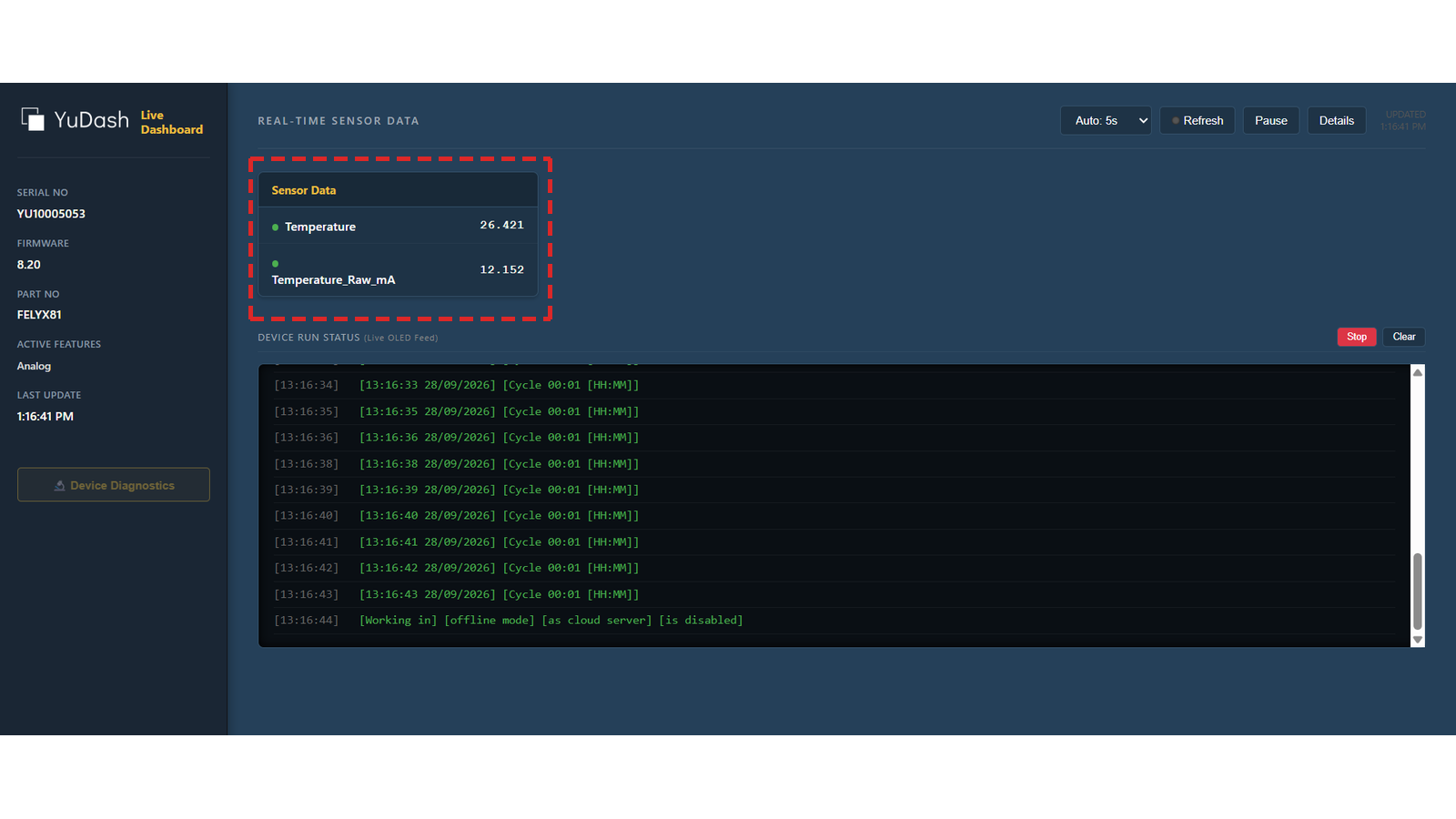
### Verify the scaled value
Open the **Live Dashboard**.
The example shows:
* `Temperature_Raw_mA` = **12.152 mA**
* `Temperature` = **26.421 °C**
This confirms that the raw transmitter current is being converted to the corresponding temperature value.
{% endstep %}
{% endstepper %}